- (800) 443-3842
- info@maxair-systems.com
- 17171 Daimler St., CA 92614
Browse a category below to explore frequently asked questions.
MAXAIR® CAPR® systems are uniquely designed, NIOSH-approved, loose-fitting powered air-purifying respirators (PAPRs) that are setting standards for today and the future of respiratory and contact protection.
CAPR® systems provide workers with an unprecedented level of safety, comfort, convenience, and cost-effectiveness while helping protect against harmful aerosolized particulates.
Depending on the complete system selected—such as Cuff, Shroud, Hood, or Hard Hat configurations—MAXAIR® CAPR® systems can provide respiratory, contact, fluid, head, and/or eye-impact protection.
MAXAIR® is a leader in no-hose, integrated helmet design, and CAPR® systems are often referred to as “The No-Hose PAPRs.”
The integrated MAXAIR® Helmet eliminates the need for a cumbersome hose (breathing tube) and bulky waist- or back-mounted blower unit. Combined with its lightweight design (a typical system weighs approximately 2.26 pounds, with the Helmet and Face/Head Cover weighing approximately 1.76 pounds) MAXAIR® CAPR® systems provide greater mobility and comfort across a wide range of workplace settings.
The many complete system configurations available fall within three primary groups:
Cuff* Systems: Most cost-effective and easiest to don and doff
Shroud* Systems: Full 360° head and neck protection
Hood Systems: Full 360° head and neck protection with high fluid resistance (ASTM F1671)
*Optional relief from nuisance levels of organic vapors (N-OV) is available.
Yes, MAXAIR® Systems are now categorized under two NIOSH PAPR classes: PAPR HE and PAPR100. These classifications were established in April 2020 through the publication of “Approval Tests and Standards for Air-Purifying Particulate Respirators.”
Which Class a PAPR is approved for by NIOSH is primarily determined by its filtering characteristics. See the FAQs section Filter Media, “What are the CAPR® Filter Configurations?”, for more information on MAXAIR® PAPR Classifications.
Yes, the up-to-date NIOSH approval numbers for MAXAIR® systems are all available on the NIOSH website.
No. All MAXAIR® Systems are positive-pressure, loose-fitting powered air-purifying respirators (PAPRs) that supply 6 to 9 cubic feet per minute (cfm) of airflow. OSHA does not require fit testing for positive-pressure, loose-fitting PAPRs.
OSHA does require annual fit testing for negative-pressure respirators, such as N95s, and for tight-fitting PAPRs, as both technologies require a tight seal against the face.
Additionally, OSHA requires all respirator users to complete a medical evaluation questionnaire before using any respirator and to undergo annual retraining on the respirators they use.
Currently, there are four MAXAIR® Base Systems to choose from, which serve as the foundation for the many different MAXAIR® CAPR® Complete Systems. (Refer to PB-CAPR-Base Systems.pdf in the Product Brochures section at https://maxair-systems.com/product-literatures.)
Each Base System consists of a Helmet, Battery, Battery Belt, and Charger.
Helmet choices include:
2081-03 for non-Hard Hat Complete Systems
2084-03 for use with PR Hoods
2083-03 for all Hard Hat Complete Systems
Battery choices include:
2500-36TSC, typically 8–10 hours per full charge
2500-37TSC, typically 12–15 hours per full charge
Belt: 2000-76
Charger: 2600-02
To configure a MAXAIR® Complete System, a Head and Face Cover and the noted Base System peripherals must be included with the selected Base System. More detailed graphical descriptions of the many available Complete System options are provided on the MAXAIR® website.
MAXAIR® Helmets are designed to provide a universal fit through both circumferential and height adjustments built into the Helmet Liner Headband.
The universal Liner/Headband features a ratchet knob that adjusts for proper circumferential fit across a range of head sizes. Adjustable side straps allow for vertical positioning and proper helmet tilt, helping ensure comfort and clear visibility of the safety LEDs within the wearer’s upper peripheral vision.
Yes. After decontamination and replacement of the comfort strips and single-use Face/Head Covers, MAXAIR® is ready for the next user.
MAXAIR® CAPR® systems can be configured with appropriate face/head covers to provide protection against airborne particulates and varying degrees of contact/splash, fluid, and impact in a broad range of markets, including but not limited to the following.
Yes. The audio quality is optimum with our cuff configurations.
For general cleaning of MAXAIR® Helmets, Batteries, Chargers, Liners, Helmet Covers, and Power Cords, we recommend using a clean, damp cloth with a mild, skin-friendly soap.
For high-level cleaning, MAXAIR® recommends two alternatives:
PDI Super Sani-Cloth® Germicidal Disposable Wipe, Q55172
Clorox Healthcare® Hydrogen Peroxide Cleaner Disinfectant, CLO30825
All MAXAIR® Face/Head Covers are single-use items and are not designed for cleaning or reuse.
MAXAIR® Filters should be discarded as contaminated waste if the Helmet’s yellow LED remains illuminated for more than approximately 10 seconds after the Helmet is powered on. Filters should also be discarded whenever they are soiled, visibly damaged, or contaminated with body fluids.
MAXAIR® noise levels are lower than those of conventional PAPRs, with an average sound level typically below 62 dB.
Yes, all configurations fit users with facial hair, that wear glasses, and nearly all head sizes and shapes.
No additional attachments are needed.
Assembly, disassembly, donning, and doffing instructions for all MAXAIR® System configurations can be found in the MAXAIR® UIMs (User Instruction Manuals) supplied with each MAXAIR® Helmet, as well as in the Item UIMs included in each box of Face/Head Covers.
The integrated motor-fan, located at the top rear of the Helmet, draws ambient air through the filter. The filtered air is then channeled through the Helmet and flows downward between the lens and the user. This provides resistance-free breathing, helps prevent lens fogging, exhausts exhaled CO₂, and delivers a cooling effect for greater user comfort.
The user can adjust the airflow switch, located on the posterior underside of the Helmet, between Low (6–7 cfm, 190 lpm), Medium (7–8 cfm, 215 lpm), and High (8–9 cfm, 240 lpm). This allows the user to match the airflow to a wide range of work environments and activity levels.
The MAXAIR® Air Flow Controller maintains each selected airflow setting at a constant level, even as the filter loads.
Note: All airflow values are approximate.
The Safety LEDs are continuously illuminated and positioned within the user’s upper peripheral vision, allowing the user to remain focused on work activities, patient care, and other tasks without distraction. The LEDs automatically alert the user when it is time to exit the environment to recharge or replace the battery and/or check the status of the filter.
When illuminated, the yellow LED indicates a low-airflow condition. If it illuminates during use, the system is approaching a point where it may no longer be able to maintain the desired airflow. At this time, the filter should be checked to determine whether replacement is necessary.
The three green LEDs, together with the red LED, provide a general indication of the battery’s remaining charge:
Three green LEDs: Approximately 75%–100% charge remaining
Two green LEDs: Approximately 50%–75% charge remaining
One green LED: Approximately 25%–50% charge remaining. At this point, the user should plan to recharge or replace the battery at the next opportunity.
No green LEDs and one red LED: Approximately 0%–25% charge remaining. The user should replace or recharge the battery as soon as possible.
If both the red and yellow LEDs are illuminated, both the battery and filter should be checked and replaced as necessary.
In a typical healthcare environment, the yellow LED should rarely illuminate because these environments generally have lower particulate loading compared with many industrial applications.
Yes. All MAXAIR® System configurations include a filter cover that protects the filter or filter cartridge.
For Cuff and Shroud Systems, the filter or filter cartridge is covered by the 2061-08 Filter Cover Cap (FCC) or the 2061-04A Hard Hat when head-impact protection is required. For Hood Systems, the Hood Filter may be protected by the 2061-05 High Fluid Resistant Filter Cover Cap (HFR FCC).
MAXAIR® CAPR® systems are uniquely designed, NIOSH-approved, loose-fitting powered air-purifying respirators (PAPRs) that are setting standards for today and the future of respiratory and contact protection.
CAPR® systems provide workers with an unprecedented level of safety, comfort, convenience, and cost-effectiveness while helping protect against harmful aerosolized particulates.
Depending on the complete system selected—such as Cuff, Shroud, Hood, or Hard Hat configurations—MAXAIR® CAPR® systems can provide respiratory, contact, fluid, head, and/or eye-impact protection.
MAXAIR® is a leader in no-hose, integrated helmet design, and CAPR® systems are often referred to as “The No-Hose PAPRs.”
The integrated MAXAIR® Helmet eliminates the need for a cumbersome hose (breathing tube) and bulky waist- or back-mounted blower unit. Combined with its lightweight design (a typical system weighs approximately 2.26 pounds, with the Helmet and Face/Head Cover weighing approximately 1.76 pounds) MAXAIR® CAPR® systems provide greater mobility and comfort across a wide range of workplace settings.
The many complete system configurations available fall within three primary groups:
Cuff* Systems: Most cost-effective and easiest to don and doff
Shroud* Systems: Full 360° head and neck protection
Hood Systems: Full 360° head and neck protection with high fluid resistance (ASTM F1671)
*Optional relief from nuisance levels of organic vapors (N-OV) is available.
Yes, the up-to-date NIOSH approval numbers for MAXAIR® systems are all available on the NIOSH website.
No. All MAXAIR® Systems are positive-pressure, loose-fitting powered air-purifying respirators (PAPRs) that supply 6 to 9 cubic feet per minute (cfm) of airflow. OSHA does not require fit testing for positive-pressure, loose-fitting PAPRs.
OSHA does require annual fit testing for negative-pressure respirators, such as N95s, and for tight-fitting PAPRs, as both technologies require a tight seal against the face.
Additionally, OSHA requires all respirator users to complete a medical evaluation questionnaire before using any respirator and to undergo annual retraining on the respirators they use.
Yes. After decontamination and replacement of the comfort strips and single-use Face/Head Covers, MAXAIR® is ready for the next user.
MAXAIR® Helmets are designed to provide a universal fit through both circumferential and height adjustments built into the Helmet Liner Headband.
The universal Liner/Headband features a ratchet knob that adjusts for proper circumferential fit across a range of head sizes. Adjustable side straps allow for vertical positioning and proper helmet tilt, helping ensure comfort and clear visibility of the safety LEDs within the wearer’s upper peripheral vision.
The Safety LEDs are continuously illuminated and positioned within the user’s upper peripheral vision, allowing the user to remain focused on work activities, patient care, and other tasks without distraction. The LEDs automatically alert the user when it is time to exit the environment to recharge or replace the battery and/or check the status of the filter.
When illuminated, the yellow LED indicates a low-airflow condition. If it illuminates during use, the system is approaching a point where it may no longer be able to maintain the desired airflow. At this time, the filter should be checked to determine whether replacement is necessary.
The three green LEDs, together with the red LED, provide a general indication of the battery’s remaining charge:
Three green LEDs: Approximately 75%–100% charge remaining
Two green LEDs: Approximately 50%–75% charge remaining
One green LED: Approximately 25%–50% charge remaining. At this point, the user should plan to recharge or replace the battery at the next opportunity.
No green LEDs and one red LED: Approximately 0%–25% charge remaining. The user should replace or recharge the battery as soon as possible.
If both the red and yellow LEDs are illuminated, both the battery and filter should be checked and replaced as necessary.
In a typical healthcare environment, the yellow LED should rarely illuminate because these environments generally have lower particulate loading compared with many industrial applications.
The user can adjust the airflow switch, located on the posterior underside of the Helmet, between Low (6–7 cfm, 190 lpm), Medium (7–8 cfm, 215 lpm), and High (8–9 cfm, 240 lpm). This allows the user to match the airflow to a wide range of work environments and activity levels.
The MAXAIR® Air Flow Controller maintains each selected airflow setting at a constant level, even as the filter loads.
Note: All airflow values are approximate.
The integrated motor-fan, located at the top rear of the Helmet, draws ambient air through the filter. The filtered air is then channeled through the Helmet and flows downward between the lens and the user. This provides resistance-free breathing, helps prevent lens fogging, exhausts exhaled CO₂, and delivers a cooling effect for greater user comfort.
MAXAIR® CAPR® systems can be configured with appropriate face/head covers to provide protection against airborne particulates and varying degrees of contact/splash, fluid, and impact in a broad range of markets, including but not limited to the following.
Always be aware that MAXAIR® Filters are designed for airborne particulates only. MAXAIR® Filters are not intended for use in environments where gases or vapors must be filtered.
MAXAIR® Cuff and Shroud Systems use individual Filter Caps and Filter Cartridges, while Hood Systems use a filter integrated into the top of the Hood.
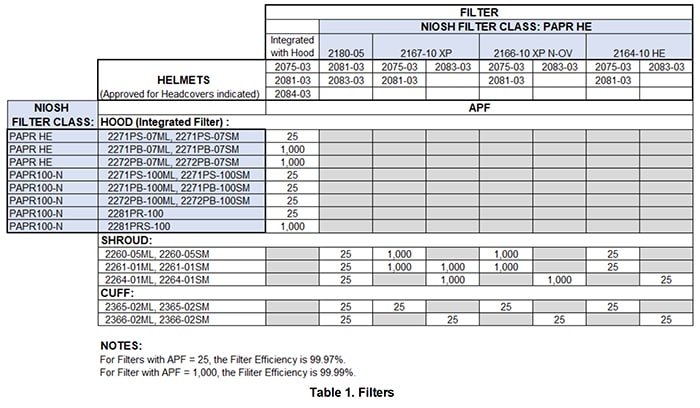
MAXAIR® CAPR® System Filters are classified by NIOSH as either PAPR HE or PAPR100-N. Table 1 below shows the different filters, their NIOSH classifications, APFs, and related minimum filter efficiencies.
Cuff and Shroud Systems – Filter Cartridges
The 2180-05 HE Filter Cap is MAXAIR®’s most recent filter innovation for Cuff and Shroud Systems. This filter provides an OSHA¹ APF of 25, NIOSH HE-level particulate filtration efficiency, and silica dust-loading capacity at a very low cost.
The 2167-10 XP and 2166-10 XP N-OV Filter Cartridges are convenient snap-on/snap-off filters for use with MAXAIR® CAPR® Cuff and Shroud System configurations.
When used with Cuff Systems, they provide an APF of 25 per OSHA.¹
When used with Shroud Systems, they meet OSHA requirements for an APF of 1,000 based on our engineering test data.
The 2166-10 XP N-OV Filter Cartridge also provides relief from nuisance levels² of organic vapors when used with both Shroud and Cuff Systems.
¹ https://www.osha.gov/sites/default/files/publications/3352-APF-respirators.pdf, Page 14, Table 1, Note 4
² Levels below the OSHA PEL, typically 5%–10% of the OSHA PEL.
Both Filter Cartridges are also classified as PAPR HE and pass NIOSH silica dust-loading testing.
Hood System Filters
CAPR® Hoods have a filter integrated into the top of the Hood. Depending on the filter, as shown in Table 1 above, it is classified as either PAPR HE or PAPR100-N.
Class HE Hoods include a NIOSH-required HLF (Heavy Loading Filter).
All MAXAIR® Hoods may be worn with an optional High Fluid Resistant Filter Cover Cap for maximum fluid protection of the filter area.
PAPR HE and PAPR100 classifications are primarily determined by filter capabilities, as indicated in the table above.
In general, MAXAIR® System filters are not intended to be exposed to water.
If water spray is possible, we recommend using:
A Shroud configuration with a Filter Cover Cap (FCC) to help protect the Filter Cartridge.
A Hood configuration with an HFR FCC (High Fluid Resistance Filter Cover Cap) to help protect the Hood Filter.
If a filter becomes wet from non-toxic, otherwise non-harmful material, it should be allowed to dry thoroughly before its next use.
Note: All Head and Face Covers are designed for single use. Hoods, which include integrated filters, are also single-use Head Covers.
Filter replacement depends on the application, the environment in which the system is used, the frequency and duration of use, and the organization’s protocol for preventing cross-contamination.
Regardless, the MAXAIR® CAPR® System’s yellow LED provides a self-monitoring function that helps account for these variables. The yellow LED will illuminate when airflow intake begins to become restricted and approaches the 6 cfm (170 lpm) threshold. This visual warning provides the user with time to exit the work environment and replace a heavily loaded filter.
Otherwise, we recommend replacing the filter at least every six to twelve months.
When illuminated, the yellow LED indicates a low-airflow condition. If it illuminates during use, the system is approaching a point where it may no longer be able to maintain the desired airflow. At this time, the filter should be checked to determine whether replacement is necessary.
The three green LEDs, together with the red LED, provide a general indication of the battery’s remaining charge:
Three green LEDs: Approximately 75%–100% charge remaining
Two green LEDs: Approximately 50%–75% charge remaining
One green LED: Approximately 25%–50% charge remaining. At this point, the user should plan to recharge or replace the battery at the next opportunity.
No green LEDs and one red LED: Approximately 0%–25% charge remaining. The user should replace or recharge the battery as soon as possible.
If both the red and yellow LEDs are illuminated, both the battery and filter should be checked and replaced as necessary.
In a typical healthcare environment, the yellow LED should rarely illuminate because these environments generally have lower particulate loading compared with many industrial applications.
There are no procedures for cleaning MAXAIR® Filters for reuse. Once a filter becomes loaded to the point that the Helmet’s yellow LED illuminates, or after 6–12 months of use, whichever occurs first, the MAXAIR® Filter should be discarded in accordance with institutional policies and local regulatory requirements.
Most users prefer the Cuff System configuration for infection control in patient care areas because it more conveniently accommodates stethoscope use.
Cuff configurations are the primary choice in environments where contact and fluid contamination are not major concerns, as the neck and the sides and back of the head remain exposed.
Shroud configurations are usually recommended over Cuff configurations when:
More complete, 360° contact and fluid protection is needed or desired.
It is acceptable and desirable to reuse the filter multiple times. This also applies to Cuff configurations, but not to Hood configurations.
Hood configurations are typically the preferred choice when the maximum protection of a Shroud is needed or desired and when disposal of the entire Head Cover and integrated filter is acceptable and economical.
Both Shroud and Hood configurations are available in single- and double-shroud styles:
The outer shroud is typically worn outside the outer body gown to help protect against splash.
The inner shroud in double-shroud and double-hood configurations is worn inside the body gown and provides:
An improved airborne contaminant seal.
A filtered-air escape mechanism.
MAXAIR® Cuff and Shroud configurations use a separate, independently installed Filter Cap or Filter Cartridge: the 2180-05 Filter Cap, 2167-10 XP Filter Cartridge, or 2166-10 XP N-OV Filter Cartridge. All MAXAIR® Hoods have a filter integrated into the top of the Hood.
The XP designation indicates that the filter meets NIOSH HE requirements for PAPR filtration, including passing the Silica Dust Loading Test.
The N-OV designation of the 2166-10 XP N-OV Filter Cartridge indicates that it also provides relief from nuisance levels of organic vapors when used with CAPR® Shrouds. Nuisance levels are below the OSHA PEL, typically 5%–10% of the OSHA PEL.
Additional considerations when selecting a configuration include:
Cuff Configurations
Cuff configurations are typically preferred when full 360° head, contact, and fluid protection is not required, as the neck and the sides and back of the head remain exposed.
Shroud Configurations
Shroud configurations are typically recommended over Cuff configurations when:
Greater contact and fluid protection is needed.
It is acceptable and desirable to use the Filter multiple times.
Hood Configurations
Hood configurations are typically preferred when the more complete protection of a Shroud is needed or desired and when disposal of the entire Head Cover and integrated Filter is acceptable and economical.
Both Shroud and Hood configurations are available in single- and double-shroud styles:
The outer shroud is typically worn outside the outer body gown to help protect against splash.
The inner shroud of double-shroud and double-hood configurations is worn inside the body gown and provides:
An improved airborne contaminant seal.
A filtered-air escape mechanism.
The following battery options are for use with MAXAIR® CAPR® and CAPR® PR Helmets.
The 2500-36TSC Lithium-Ion Battery is the primary battery included with MAXAIR® System configurations. It typically provides 8–10 hours of continuous use per full charge and is ideal for low-particulate, low filter-loading environments, such as hospitals. This battery is compact and lightweight.
The 2500-37TSC Lithium-Ion Battery is an alternative option for all systems and typically provides 12–15 hours of continuous use per full charge. It is the same size and weight as the 2500-36TSC.
The latest TSC battery design includes a secure, spring-loaded push-button locking mechanism that helps ensure a secure connection between the Power Cord and Battery.
Note: Thoroughly review the MAXAIR® Ensure Readiness Program for proper care and use of MAXAIR® Batteries.
The following information applies to batteries used with MAXAIR® CAPR® and CAPR® PR Helmets.
The battery can typically be recharged 450–500 times, also known as full charge cycles. A full charge cycle is defined as a complete discharge followed by a complete recharge.
Partial-cycle charging is safe and reliable with Lithium-Ion batteries. Partial charges are cumulative and together make up full charge cycles when estimating the battery’s expected service life.
Note: Thoroughly review the MAXAIR® Ensure Readiness Program for proper care and use of MAXAIR® Batteries.
The following information applies to batteries used with MAXAIR® CAPR® and CAPR® PR Helmets.
The 2500-36TSC Lithium-Ion Battery takes approximately 4–6 hours to fully recharge. The 2500-37TSC requires approximately 5–7 hours for a full recharge, while the 2500-30TSC requires approximately 6–8 hours.
Note: Thoroughly review the MAXAIR® Ensure Readiness Program for proper care and use of MAXAIR® Batteries.
The following information applies to batteries used with MAXAIR® CAPR® and CAPR® PR Helmets.
Do not leave batteries connected to the charger after they are fully charged and the Charger LED turns green. There is no practical benefit to leaving a MAXAIR® Lithium-Ion Battery connected to a MAXAIR® Charger once it is fully charged.
Leaving batteries connected to chargers for longer than a maximum of 8–10 hours may increase the risk of an issue occurring between the main power source and the battery, potentially affecting battery performance.
Once the Charger LED turns green, disconnect the Battery from the Charger.
Note: Thoroughly review the MAXAIR® Ensure Readiness Program for proper care and use of MAXAIR® Batteries.
The following information applies to batteries used with MAXAIR® CAPR® and CAPR® PR Helmets.
Upon initial purchase, the battery is delivered at approximately 50% of a full charge and may be stored as received. At this charge level, it can provide approximately 4–5 hours of use without first being recharged.
Thereafter, we recommend recharging the battery at least once or twice annually. Refer to the User Instructions included with each Helmet shipment for additional guidance on intermittent use and long-term storage.
Note: Thoroughly review the MAXAIR® Ensure Readiness Program for proper care and use of MAXAIR® Batteries.
Check with your Biohazard, Bioengineering, or Safety Department for existing hospital protocols and procedures regarding battery charging.
Batteries must never be charged in patient care areas.
Note: Thoroughly review the MAXAIR® Ensure Readiness Program for proper care and use of MAXAIR® Batteries.
The following information applies to batteries used with MAXAIR® CAPR® and CAPR® PR Helmets.
Yes. A belt is supplied with all applicable MAXAIR® Systems and is also available for purchase as an add-on or replacement.
The MAXAIR® System Belt and Battery may be worn under the outer infection-control gown; therefore, only one standard belt is needed.
Additionally, because the Belt and Battery are worn beneath the outer infection-control gown, decontamination of these components is generally not required.
A 6-Gang Charger, the 2602-06, is available and includes six, 2600-02 chargers clipped on a single bracket. It includes wall mounting hardware.
A 6-Gang Charger Bracket, the 2602-06B, is available for use with up to six existing 2600-02 chargers. A single, bracket-to-wall power cord and wall mouting hardware are included.
MAXAIR® Helmets uniquely channel airflow down the inside of the lens and across the user’s face, helping maintain a fog-free field of view while providing a cooling effect for greater comfort.
The Velcro-backed foam strips provide added comfort and hygiene for MAXAIR® Systems.
To replace the comfort strips, simply remove the used strips and press the new ones into place.
CAPR® Systems use a removable front headband Comfort Strip. The rear headband features a cleanable, closed-cell foam strip that does not require routine replacement.
One 2000-201 box contains 36 Comfort Strips, providing enough for 36 replacements.
MAXAIR® Systems offers the following storage and deployment accessories, which are described on our website.
2000-204 “J” Hooks – Six hooks per bag
2782-06 MAXAIR® Systems Cart – Provides mobility, storage, and security for up to six systems and their primary accessories
2000-SB Sample Bag – Designed to carry one to two MAXAIR® Systems
Cuffs: Barrier material and polyurethane/polypropylene.
Shrouds: White portions are polypropylene; blue portions are polypropylene/polyurethane/polyethylene.
Hoods: Polypropylene and a polypropylene/modacrylic blend.
DLC Cuffs: Polycarbonate and PETG
No. MAXAIR® Systems, components, and disposables are Latex Free.
Please refer to your institution’s standard operating procedures for cleaning surfaces contaminated with blood or bodily fluids.
For general cleaning of MAXAIR® Helmets, Batteries, Chargers, Liners, Helmet Covers, and Power Cords, we recommend using a clean, damp cloth with a mild, skin-friendly soap.
For high-level cleaning, MAXAIR® recommends two alternatives:
PDI Super Sani-Cloth® Germicidal Disposable Wipe, Q55172
Clorox Healthcare® Hydrogen Peroxide Cleaner Disinfectant, CLO30825
All MAXAIR® Face/Head Covers are single-use items and are not designed for cleaning or reuse.
MAXAIR® Filters and Pre-Filters should be discarded as contaminated waste if the Helmet’s yellow LED remains illuminated for more than approximately 10 seconds after the Helmet is powered on. They should also be discarded whenever they are soiled, visibly damaged, or contaminated with bodily fluids.
Before using any cleaning agent on any material, we recommend testing the agent on a sample to evaluate both short- and long-term effects and help ensure product and user safety. MAXAIR® Systems is not responsible for the results of cleaning procedures that fall outside the cleaning agents and protocols identified in this Technical Bulletin or outside the cleaning agent manufacturer’s product-use and safety recommendations for the key materials listed herein.
Refer to Technical Bulletin MAXAIR® Systems Cleaning, P/N 04123046, for additional details.